Intelligent Workflows for SMBs: Complete Guide 2026
Discover how small and medium-sized businesses are implementing intelligent workflows in 2026 without an in-house IT team, automating processes with tailored AI and custom code.
Intelligent Workflows for SMEs: What They Are and Why They Matter in 2026
An intelligent workflow is a sequence of business operations that is automated and guided by artificial intelligence, capable of making simple decisions, routing data between different systems and reducing repetitive manual work. For an SME, this can mean freeing up hours of work, reducing human errors and handling greater volume without adding manual effort. This is not technology reserved for large corporations: in 2026 it is accessible, measurable and concrete.
In Italy, the digitalization of SMEs remains a work in progress: many small and medium-sized businesses still operate with manual processes on Excel spreadsheets, emails and phone calls, leaving efficiency and recoverable margins on the table.
What Makes a Workflow Truly Intelligent for an SME
A workflow is intelligent when it does not simply move data from point A to point B, but interprets context, handles exceptions and adapts to the actual behavior of business processes.
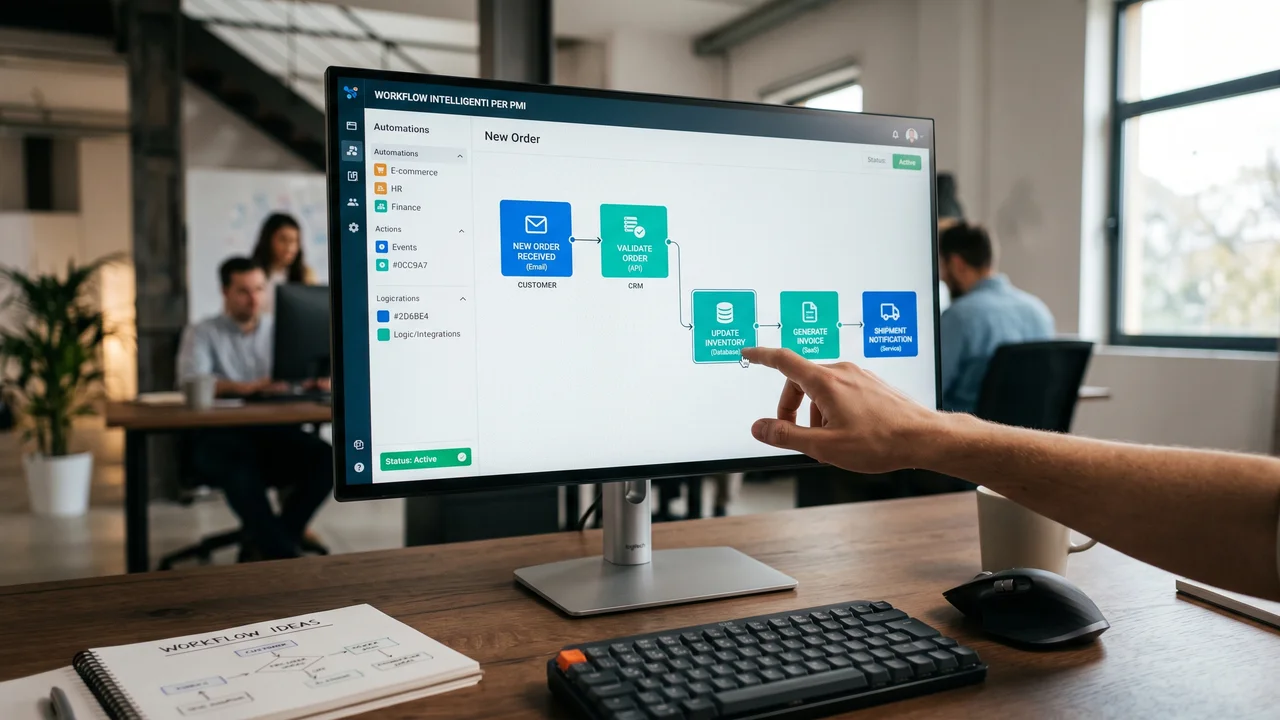
The difference between a simple automation and an intelligent workflow lies in the ability to handle variability. In a manufacturing SME, for example, a customer order does not always follow the same path: it may require a stock check, a commercial approval or a technical modification. A traditional workflow breaks down at the first exception. An intelligent one, built with AI logic, recognizes the type of exception and routes it to the right person, or resolves it autonomously if it matches a known pattern.
There are three key components of an intelligent workflow for an SME. The first is the ability to read and interpret unstructured data: emails, PDFs, hand-filled forms and WhatsApp messages. The second is advanced conditional logic, which allows dozens of different scenarios to be handled without having to program every individual case. The third is native integration with the systems already in use within the company, from the ERP to the CRM, without requiring costly migrations.
Scenario 1: The HR Consulting Firm That Processes Dozens of Contracts per Month
An illustrative scenario: a firm that processes many employment contracts each month for its clients, and for each one goes through data collection, drafting, sending for signature and archiving. With an intelligent workflow connected to the management system, the system collects data from the client form, generates the document, sends it for digital signature and archives it in the correct folder, while staff handle verification. The time saved is measurable in practice.
Scenario 2: The Logistics Company That Reconciles Invoices from Multiple Couriers
A second typical scenario: a logistics company with a few dozen employees manages daily shipments with three different couriers, each of which sends billing data in its own format. The operations team can end up spending a significant amount of time just aligning the numbers. An intelligent workflow reads the couriers' PDF invoices, extracts the relevant data, compares it with orders in the management system and flags only the discrepancies, which a person then reviews.
The Limitations of Traditional No-Code Tools for Growing SMEs
Third-party no-code tools offer an appealing speed of deployment, but show clear structural limitations when business processes become more complex or volumes grow.
Visual automation tools promise anyone the ability to build automations without writing a single line of code. For many SMEs, that promise has collided with operational reality: real business processes are rarely linear, and visual platforms struggle to handle complex conditional logic, integrations with legacy systems or high data volumes without degrading performance.
The most common problems that SMEs encounter with third-party no-code tools can be summarized in five categories:
- Vendor dependency: if the platform changes its pricing, modifies its APIs or shuts down the service, the entire automation stops working.
- Limited scalability: free or entry-level versions have monthly operation limits that quickly become a bottleneck as the business grows.
- Difficult debugging: when a visual automation breaks, identifying the point of failure takes time and skills that often do not exist within the company.
- Data security: company data passes through third-party servers, with GDPR compliance implications that many SMEs underestimate.
- Blocked customization: the logic is limited to what the tool allows visually. Use cases specific to the industry or the company remain out of reach without working around the limitations with fragile workarounds.
The Pure-Code Approach: More Control, More Reliability
An intelligent workflow built in pure code can belong entirely to the company that commissions it: no lock-in to a platform, no artificial operation limits and a data perimeter defined at the project stage.
The choice to develop automations in pure code, rather than relying on third-party visual platforms, is not a matter of technical complexity for its own sake. It is a strategic choice concerning process ownership, data security and the ability to adapt the workflow over time without depending on an external vendor.
For an SME, this approach has a concrete impact on three dimensions. The first is stability: an automation written in pure code does not break because a vendor has updated its platform. The second is genuine customization: every business rule, every exception, every integration with existing company systems can be modeled exactly as needed, without compromises dictated by a visual interface. The third is cost over time: instead of subscription fees for third-party platform licenses, there is a development and maintenance cost, and the comparison must be made on a case-by-case basis.
What This Means in Practice for an SME Without an IT Team
An SME without in-house developers does not need to worry about the underlying technical complexity: the partner developing the workflow in pure code handles everything, from design to deployment, from maintenance to updates. The owner or operations manager interacts with the final result, not the code. The difference compared to a no-code tool is that the result is built precisely around the company's processes, not adapted to the limitations of a generic platform.
The Business Processes Best Suited to AI Automation in SMEs
The processes with the greatest return on investment for SMEs are those with high repetitiveness, low creative variability and a strong impact on the time of key people.
Not all business processes deserve to be automated with the same priority. Selecting the right processes is the first step of any effective automation project, and depends on three variables: how frequently the process is executed, how much time it absorbs each time and the cost of human error when something goes wrong.
In practice, certain processes frequently emerge as good starting points:
- Document management: automatic generation of contracts, quotes, delivery notes, invoices and reports from management system data.
- Lead qualification: automatic analysis of incoming requests (emails, forms, chat) with scoring and routing to the correct sales contact. Shortens response time.
- Client and supplier onboarding: automatic document collection, verification, archiving and notifications. Reduces follow-up emails.
- Data reconciliation: automatic comparison of orders, invoices, payments and shipments with flagging of real anomalies only.
- Operational reporting: automatic generation of dashboards and weekly or monthly reports by aggregating data from multiple sources without manual intervention.
- Appointment management and follow-up: automatic scheduling, reminders and post-meeting follow-up with AI-generated meeting note summaries.
Scenario 3: The Construction Company with Quotes in Excel
A third recurring scenario: the owner of a construction company spends several hours each week collecting data from subcontractors, pricing materials and building quotes in Excel. A lengthy process, prone to errors and difficult to delegate, because it requires their direct knowledge of costs. With an intelligent workflow connected to the management system, drafting a quote can be reduced to a few steps: the system aggregates the data, applies the pricing rules and generates the final document for review and approval. The scenario is illustrative, but a real case points in the same direction: in the ERP Costruzioni project, drafting a quote went from 8 hours to 5 clicks, in 30 days.
How to Implement an Intelligent Workflow Without an In-House IT Team
Implementing an intelligent workflow without an in-house IT team is possible if you follow a structured method broken into short phases, with a partner who translates operational requirements into technical logic.
The most effective implementation path for an SME without internal IT resources is structured in four phases, each with a concrete and verifiable output. The overall duration depends on the complexity of the process and the systems involved.
Phase 1 (Mapping): the partner analyzes the existing process together with the operations manager, identifying manual steps, the data sources involved and the most frequent points of failure. The output is a map of the current flow with bottlenecks highlighted. This phase requires no technical expertise on the client's part.
Phase 2 (Design): the partner translates the operational map into a technical architecture, defining the necessary integrations, the AI logic and the human control points. The client validates the logic in non-technical language before development begins.
Phase 3 (Development and testing): the workflow is built in pure code, tested on real company data and refined based on operational feedback. Tests are run in parallel with the existing manual process, without disrupting operations.
Phase 4 (Go-live and training): the workflow goes into production with a period of active supervision. The company team receives practical training focused on day-to-day use, not on the underlying technology.
What Questions to Ask the Partner Before Starting
Before entrusting an automation project to an external partner, it is worth verifying a few concrete aspects: who owns the developed code at the end of the project, how updates are managed over time, which servers the data resides on and how operational continuity is guaranteed in the event of technical problems. A serious partner answers these questions clearly, without deferring to generic documentation.
Concrete Results and How to Choose the Right Partner
The results of a well-implemented intelligent workflow are measured in hours saved, errors avoided and the ability to handle greater volume without increasing manual work.
Document management and lead qualification processes are often a good starting point, because the manual work involved is substantial and measurable. About Medically S.r.l., a company in the parapharmaceutical sector, recorded an 85% increase in document generation speed within 90 days. A marketing agency in Rome, using voice AI agents, achieved 80% more qualified leads.
Choosing the right partner to automate an SME's processes requires evaluating at least four elements. The first is specific experience with companies of a similar size: a partner accustomed to working with large enterprises tends to over-engineer solutions for smaller organizations. The second is transparency regarding ownership of the code and data. The third is the ability to start with a single process and scale over time, without imposing a total digital transformation all at once. The fourth is the availability of verifiable real cases, with concrete numbers and reachable clients.
- Verify code ownership: the developed workflow must belong to your company, not the vendor.
- Ask for verifiable references: a logo on a website is not enough, you need a case with numbers and a real contact.
- Evaluate the project methodology: a good partner starts from process mapping, not from a technology proposal.
- Check data management: where it resides, who has access to it and how it is protected in compliance with GDPR.
- Prefer incremental approaches: a first project on a single process that goes into production quickly is safer than a total transformation.
Frequently Asked Questions About Intelligent Workflows for SMEs
How Much Does It Cost to Implement an Intelligent Workflow in an Italian SME?
The cost depends on the complexity of the process and the number of integrations required. For a workflow on a single process (such as document generation or lead qualification), the cost depends on the systems involved and the return must be verified in practice, by comparing hours saved and errors avoided against the cost of building and maintaining the solution. A preliminary analysis with the partner allows for a realistic estimate before committing.
Is It Necessary to Have an ERP or CRM Already Active to Automate Processes?
No, it is not an absolute prerequisite. Many intelligent workflows function even starting from simple data sources such as Excel spreadsheets, emails or web forms. However, having an ERP or CRM already in use speeds up implementation and increases the value of the automation, because the data is already centralized. The technical partner assesses the existing situation and designs the most suitable integration.
How Long Does It Take to See the First Concrete Results?
For the most common processes in SMEs, such as document management or lead qualification, the approach is to start with a small, useful portion of the process that goes into production quickly and can be evaluated in practice. Cases such as ERP Costruzioni (from 8 hours to 5 clicks in 30 days) show that timelines can be very short when the process is well defined and the partner works methodically.
Is Company Data Safe with an Intelligent Workflow?
Data security depends on the chosen architecture. A workflow developed in pure code can be hosted on the company's own servers or on dedicated cloud environments with controlled access, and the data perimeter is defined at the project stage: if it uses AI models from an external provider, it must be made clear what leaves the perimeter and what does not. This facilitates GDPR compliance, which for Italian SMEs remains a mandatory requirement that should not be underestimated.
Can I Automate Just One Process at a Time, or Do I Have to Transform the Entire Company at Once?
The incremental approach is the recommended one for SMEs: start with a single high-impact process, measure the result and scale gradually. This reduces operational risk, allows the team to adapt without stress and, if the first project generates savings, allows those savings to be reinvested in subsequent ones. There is no technical or strategic reason to have to transform everything at once.
This post was created with AI
Content (text, processing, quotations and images) generated or artificially manipulated by artificial-intelligence systems. Notice provided under the transparency obligations of Article 50 of Regulation (EU) 2024/1689 (AI Act), applicable from 2 August 2026.